Beyond Voice Notes: A Personal Life Intelligence System
How Chela turns everyday conversations with yourself into remembered details, useful routines, and a clearer picture of your life.
V Vishal RanaFounder, Chela.ioYou remember that a friend has something important coming up. You remember promising to check in. You can't remember whether it was Thursday or next Thursday, and now you're scrolling through messages trying to work it out.
Meanwhile, you've been meaning to practise guitar again. You're fairly sure you've been sleeping better. There was also a reason you decided against the cheaper quote for the kitchen, but you would have to find the note to explain it.
None of these is a particularly big problem. Together, they take up a surprising amount of space.
I'm building Chela because I want somewhere for those details to go while they're still fresh. As a developer and a father, I know how quickly a day can fill up before there's time to organise it.
Chela starts with AI voice notes. You record what you want to keep, and it organises the speech into notes, tasks, reminders, and tracked activities. What interests me most is what happens after that first recording.
What I mean by a personal life intelligence system
A personal life intelligence system, as I use the phrase, keeps your everyday information connected so you can retrieve it, reflect on it, and follow through. The memory of a conversation, the reminder it creates, and the person it concerns should remain useful together.
That sounds abstract until you put an ordinary day into it. Here are five illustrative situations based on Chela's functionality. The notes are invented examples, not customer testimonials.
1. Remember the detail that makes a follow-up thoughtful
A friend calls while you're making lunch. She's preparing for a job interview, and you want to ask how it went. After the call, you record:
Anika's final interview is Thursday morning. She's excited about the team but worried about the commute. Remind me to check in with her Thursday at seven in the evening.
The reminder has an action and a time. The note has the part that makes the conversation personal: what Anika was excited about, and what was bothering her.
Chela supports relationship memory alongside reminders and search. Later, a question such as “What did Anika tell me about the new job?” gives that saved detail a way back into the conversation.
You still make the call. You still listen. But you don't have to begin by asking her to repeat everything she already told you.
2. Give a routine a place in the week
“I should play guitar more” is a familiar kind of intention. It can sit around for months without becoming an actual Tuesday evening.
A more useful note would be:
I want to practise guitar for fifteen minutes after dinner every Tuesday and Thursday. On Saturday at ten, spend half an hour working on one full song.
Chela's daily checklist can draw on saved notes and routines. Stating the days and timing gives it something concrete to bring into the relevant day's list. You don't have to write out the same plan every week.
Then, when you practise, you can record what happened:
Practised guitar for twenty minutes. The chord changes are getting smoother, but I still lose the rhythm when I start singing.
With practice minutes set up as a custom metric, you have a quantity to track. The note also preserves the difficulty you want to work on next.
Those two things answer different questions. “Did I practise?” matters. So does “What was I trying to get better at?”
3. Check your impression against your own record
At the end of a month, it's easy to say, “I've barely walked lately.” Perhaps that's true. Perhaps the last few days were unusually busy and are colouring your memory of the whole month.
A short log can be enough to leave some evidence:
Walked for thirty-five minutes after lunch. Slept seven and a half hours last night. Had about two litres of water today.
Chela can track these metrics from speech. Ask Chela also supports visual answers, including charts, heatmaps, progress views, and timelines. You can ask, “Show my walking activity this month,” and review the record you've actually built.
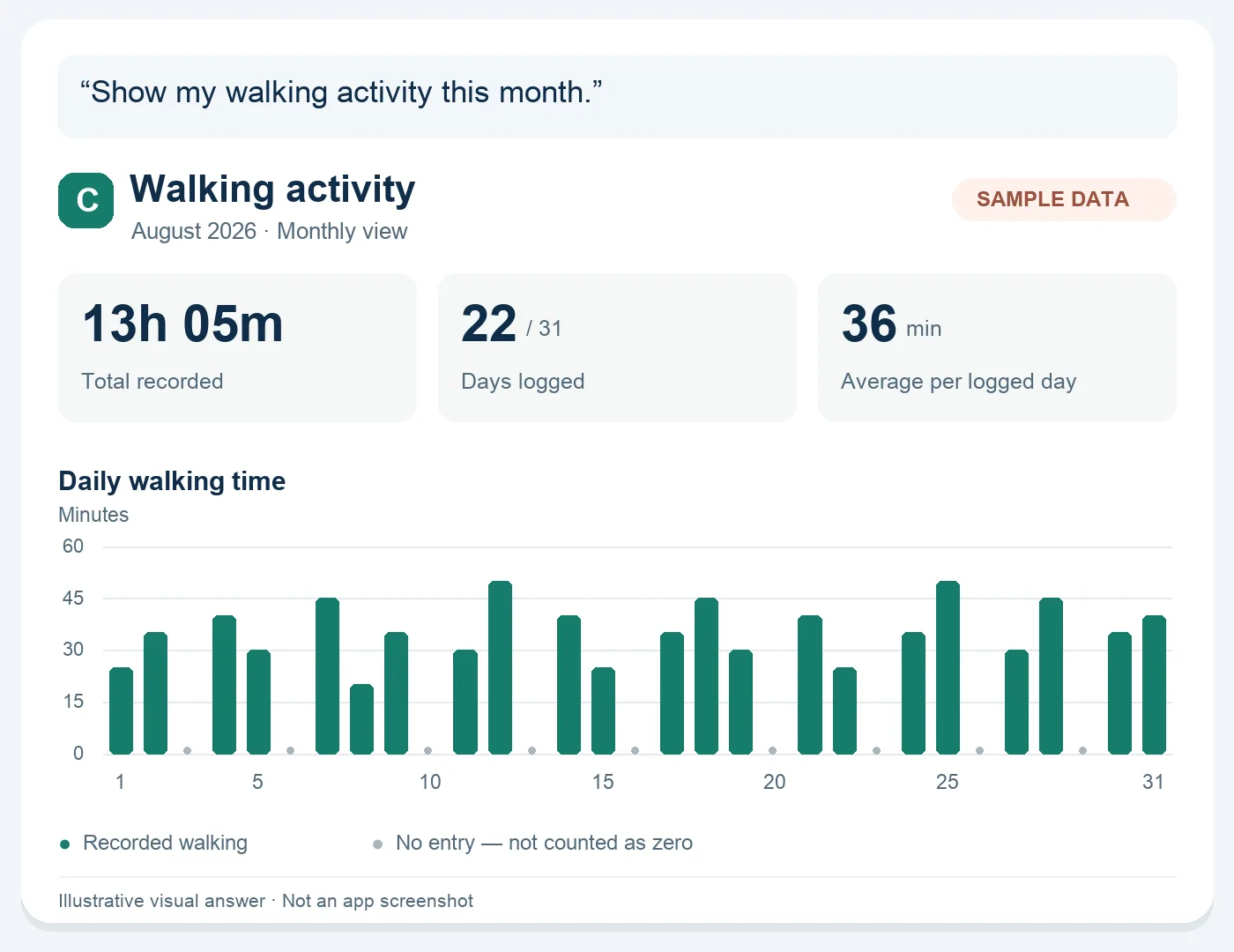
That's useful even when there is no surprising insight. You might simply discover that a few missed days didn't erase the rest of the month.
There is an important limit here: a blank day means there is no recorded value. It doesn't establish that you did nothing. The picture is only as complete as what you chose to capture.
4. Keep the reason behind a decision
You're comparing two kitchen renovation quotes. A few weeks later, someone asks why you chose the more expensive one. The prices are easy to find. The reasoning takes longer.
A voice note made after the discussion might say:
The cheaper quote leaves out the electrical work and doesn't include disposal. We prefer the second contractor because both are included. Before we pay the deposit, ask for the cabinet dimensions in writing. Remind me tomorrow at eleven.
Chela can extract the follow-up while keeping the explanation searchable. If you're collecting several notes about the renovation, categories and category-specific AI search help keep questions focused on that project.
“What was missing from the first quote?” is then a question you can bring to your own notes. You don't need to remember which afternoon you recorded the answer.
This is useful for decisions that don't feel significant enough to document formally. They're often the ones you end up explaining twice.
5. See the circumstances around a habit you're changing
Suppose you're trying to stop opening social media in bed. You manage a few evenings, then spend forty minutes scrolling on Wednesday.
The count alone doesn't tell the whole story. You could also record:
I started scrolling after a frustrating support call. I wasn't really interested in anything on the screen. I just didn't want to think about the call anymore.
Chela's Quit It feature tracks habits you want to leave behind, including social media use. Voice journaling gives you room to keep the circumstances alongside that effort.
Later, you can search for what you said about those evenings. Perhaps the same situation comes up more than once. Perhaps it doesn't. Either way, you have something more specific to reflect on than “I need more willpower.”
A repeated detail is a reason to ask a better question. It isn't proof of a cause, and the app can't know what you didn't tell it.
The connection is the useful part
These examples involve different features, but they share a simple idea: information becomes more useful when you can carry its context forward.
The guitar log can hold both the minutes and the troublesome chord change. A reminder about Anika can sit alongside what she was worried about. A renovation task can retain the reason the task exists.
There is research behind this way of thinking. A study of personal informatics by Ian Li, Anind Dey, and Jodi Forlizzi describes stages from collecting information through integration, reflection, and action. It also recommends exploring connections between multiple aspects of people's lives.
For me, that is a useful test of the product. After something has been saved, can it help you with an actual question or responsibility?
A small way to try the idea
For a week, capture three kinds of things when they occur: something you promised, something you did, and something you want to remember about how the day felt.
Keep the words ordinary. Include a day and time when you need a reminder. Record the reason for a decision while you still remember the conversation.
At the end of the week, ask one question that would otherwise send you hunting. What did I promise Anika? What did I practise? What do I need to confirm before paying that deposit?
That's the standard I want Chela to meet: helping you pick up a thread of your own life without having to reconstruct it from scratch.
I'm Vishal Rana, the founder of Chela. The app is available for iPhone and Android. You can find current features in the App Store release notes and Google Play listing, and read how personal information is handled in the privacy policy.